
- Walter Becker and Donald Fagen
ListMaster
ListMaster Methods
| ListMaster() | Constructor for the ListMaster class |
| AddColumn() | Adds a column to the ListMaster control |
| NumItems() | Returns total number of items in the List control |
| GetItem() | Returns reference to the ListItem object based on one based index |
| NumSelectedItems() | Returns the number of selected items in the ListMaster control |
| GetSelectedItems() | Returnsan array of ListItem objects representing the selected items in the ListMaster control |
| RemoveItems() | Removes all items from the ListMaster control |
| RemoveColumns() | Removes all columns from the ListMaster control and deletes all items if any exist |
Derived Classes
None
See Also
Class Hierarchy, Frame, ChildFrame, Dialog, ListItem
public method ListMaster(Window Parent, int XPos, int YPos, int Width, int Height, bool MultiRowSelect = true, bool FullRowSelect = true)
Parameters
Parent
Parent window for the ListMaster control
XPos
One based X position of control relative to parent
YPos
One based Y position of control relative to parent
Width
Initial width of the control in pixels
Height
Initial height of the control in pixels
MultiRowSelect
Multiple rows can be selected simultaneously if true
FullRowSelect
All columns for a selected row is highlighted if true - just the first column is highlighted if false
Return Value
None
Description
Constructor for the ListMaster class. It creates a ListMaster control with the specified parent and size as specified. If the width and height are specified as zero, the ListMaster control will assume the entire size of its parent. This is useful when the parent is a SplitterPane window. If MultiRowSelect is true, the 'ctrl' and 'shift' buttons, together with the left mouse button, can be used to select multiple list items.
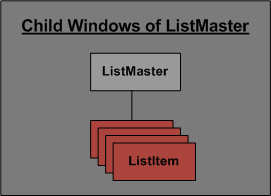
A ListItem object is the only valid child of a ListMaster control.
ListMaster Class
public method<int> AddColumn(string HeaderText, int Index = 0, int Width = 100)
Parameters
HeaderText
Text string to be displayed in header for this column
Index
One based index to specify position of item (0 is default)
Width
Width of the column in pixels (100 is default)
Return Value
One based index of the column that was added
Description
This public method adds a new column to the ListMaster control. If the default index is used (0), the column becomes the last column in the list control. If it is greater than zero, the column is inserted into that position. The width of the column is also specified, with a default of 100. The method returns the one based index of the column.
ListMaster Class
public method<int> NumItems()
Parameters
None
Return Value
Number of items
Description
This public method returns the total number of ListItem objects in the ListMaster control.
ListMaster Class
public method<ListItem> GetItem(int Index)
Parameters
Index
One based index to specify position of item
Return Value
ListItem specified by one based index
Description
This public method returns the ListItem object which is in the position specified by the one based index. Returns null of the index is invalid.
ListMaster Class
public method<int> NumSelectedItems()
Parameters
None
Return Value
Number of selections
Description
This public method returns the number of ListItem objects which are currently selected within the ListMaster control.
ListMaster Class
public method<ListItem[]> GetSelectedItems()
Parameters
None
Return Value
Array of currently selected items (can be null)
Description
This public method returns an array of ListItem objects which are currently selected within the ListMaster control. If there are no items selected, this method will return null.
ListMaster Class
public method RemoveItems()
Parameters
None
Return Value
None
Description
This public method removes all items from the ListMaster control.
ListMaster Class
public method RemoveColumns()
Parameters
None
Return Value
None
Description
This public method removes all columns from the ListMaster control and also removes all items if any exist.
ListMaster Class